
WooCommerce Bulk Stock Management v2.3.8
 By ShineGPL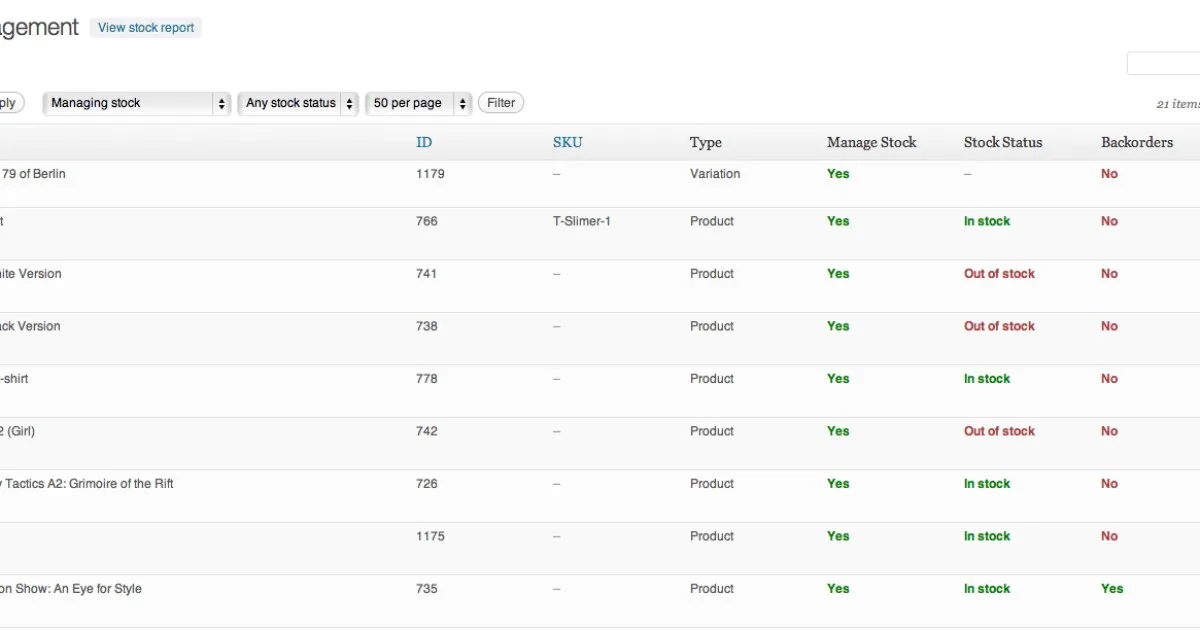
Overview & Details
WooCommerce Bulk Stock Management adds a central stock screen under Products > Stock management that replaces slow, one by one product editing. Instead of opening each simple product, variable product, and hidden variation separately, shop managers see quantities, SKUs, and stock status in one editable list. It removes manual clicking, copy errors, and missed variations, which makes routine inventory updates faster and more reliable for busy stores.
It is ideal for clothing stores with size variations, electronics shops, grocery and warehouse based WooCommerce stores that handle frequent deliveries and stocktakes. Working directly with native WooCommerce inventory, simple products, variable products, and variations, it fits daily tasks like updating counts after a shipment, correcting counts after manual checks, marking delayed supplier lines out of stock, and preparing a printable report for warehouse staff without backend access on busy sales days.
WooCommerce Bulk Stock Management Key Features
- Central Stock Table: View all products and variations with name, SKU, manage stock flag, and quantity in one screen.
- Inline Quantity Editing: Type new stock numbers directly into each row and save many products together.
- Full Variation Rows: Edit each size or option as a separate line without opening the parent product.
- Bulk Status Actions: Select multiple items and set them in stock, out of stock, or on backorder at once.
- Filter By Product Type: Narrow the list to simple, variable, variation, or other inventory types quickly.
- Filter By Stock Control: Show only items with stock management enabled or disabled to spot setup gaps.
- Filter By Stock Status: Find in stock, out of stock, and backorder items for reorders or supplier delays.
- Flexible Sorting: Order results by name, ID, SKU, or stock quantity to prioritize low stock.
- Printable Stock Report: Generate a clean overview of current levels for warehouse checks and stocktake day.
- Staff Friendly Workflow: Designed for shop managers and warehouse teams handling routine inventory updates.
Download Latest GPL Version of WooCommerce Bulk Stock Management
You can use the GPL package to test bulk quantity editing, variation rows, filters, and bulk status changes in a staging or LocalWP setup before touching a live shop. This helps you confirm SKU display, stock accuracy, and staff workflow without risking overselling or downtime from a wrong count. For live sales, order sync, and customer support, buying an official license remains the right choice for production stores.
Note: If you find difficulty to free download WooCommerce Bulk Stock Management, contact us through Telegram or WhatsApp.
Download WooCommerce Bulk Stock Management v2.3.8
Choose your preferred download method below to get instant access to the genuine GPL archive:


