
Kembang – Flower Shop & Store WooCommerce Elementor Pro Template Kit v1.0
 By Shine GPL Security Team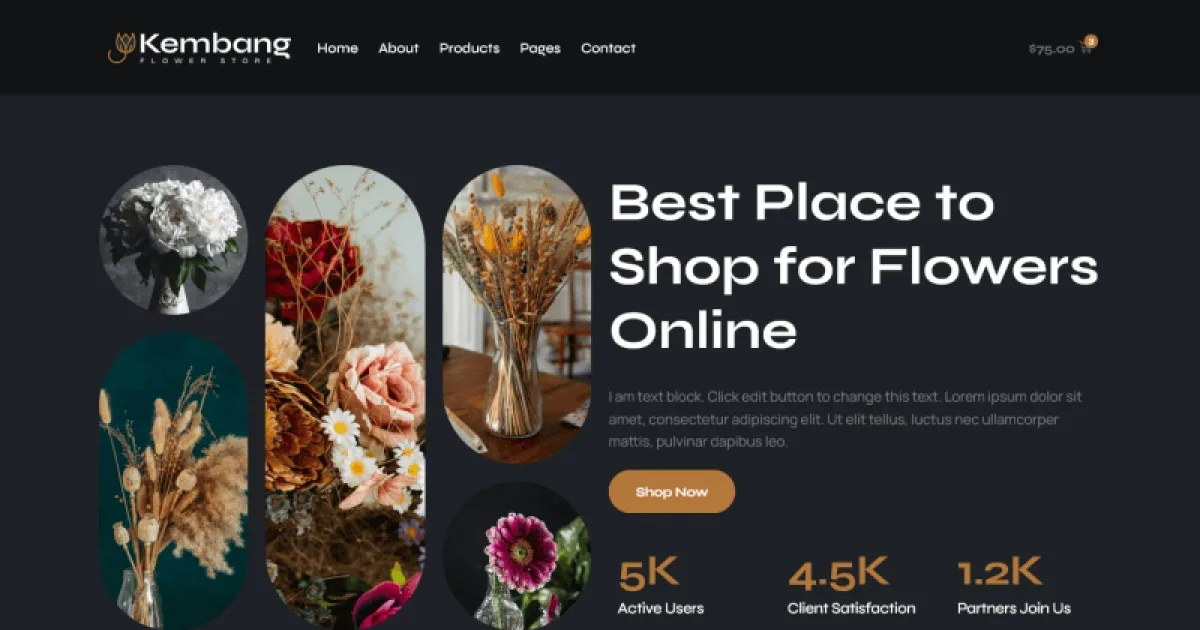
Overview & Details
Kembang is an Elementor Template Kit for flower shops and floral stores that need a polished online presence without spending days designing every page manually. It addresses the common challenge of presenting flower products, store information, customer services, and purchase flows in one consistent layout. Webmasters can start with prepared Elementor content, then adjust colors, typography, sections, and product displays instead of building WooCommerce pages from scratch.
With Kembang, users can create a complete flower store website with Home, Product, Product Details, Cart, Checkout, My Account, About, Contact, Blog, Blog Single, Faq, 404, Header, Footer, and Global Style templates. Elementor, WooCommerce, and The Plus Addons for Elementor are required. Elementor Pro is needed for some templates and features. Daily edits can include replacing flower images, updating product details, changing text, adjusting layouts, and configuring store content.
Kembang Key Features
- Flower Store Layouts: Provides page designs suited to flower shops and floral product businesses.
- WooCommerce Templates: Includes Product, Product Details, Cart, Checkout, and My Account layouts for store content.
- Homepage Template: Offers a prepared Home layout for presenting products, services, and business information.
- Business Information Pages: Includes About and Contact templates for company details and customer communication.
- Content Templates: Provides Blog, Blog Single, Faq, and 404 page designs.
- Sitewide Structure: Includes Header, Footer, and Global Style templates for consistent presentation.
- Elementor Compatibility: Built for Elementor and compatible with the free Hello Elementor theme and most Elementor-supported themes.
- Plugin Integration: Requires Elementor, WooCommerce, and The Plus Addons for Elementor.
- Customizable Design: Allows practical changes to text, images, colors, typography, product information, and page sections through Elementor.
Download Latest GPL Version of Kembang Elementor Template Kit
Before deploying Kembang for a client, import the templates in a local XAMPP or LocalWP staging environment using the Envato Elements plugin or Elementor installation method. Test the layouts at desktop, tablet, and mobile breakpoints, then verify Header and Footer assignments, WooCommerce flows, and Contact form behavior. An official license is recommended for live client websites when author support and licensed stock assets are required.
Note: If you find difficulty to free download Kembang, contact us through Telegram or WhatsApp.
Download Kembang – Flower Shop & Store WooCommerce Elementor Pro Template Kit v1.0
This file is available exclusively to active Premium Members. Subscribe to any plan to unlock instant download access:


