EvokeStudio – Creative Digital Agency Elementor Pro Template Kit v1.0
 By Shine GPL Security Team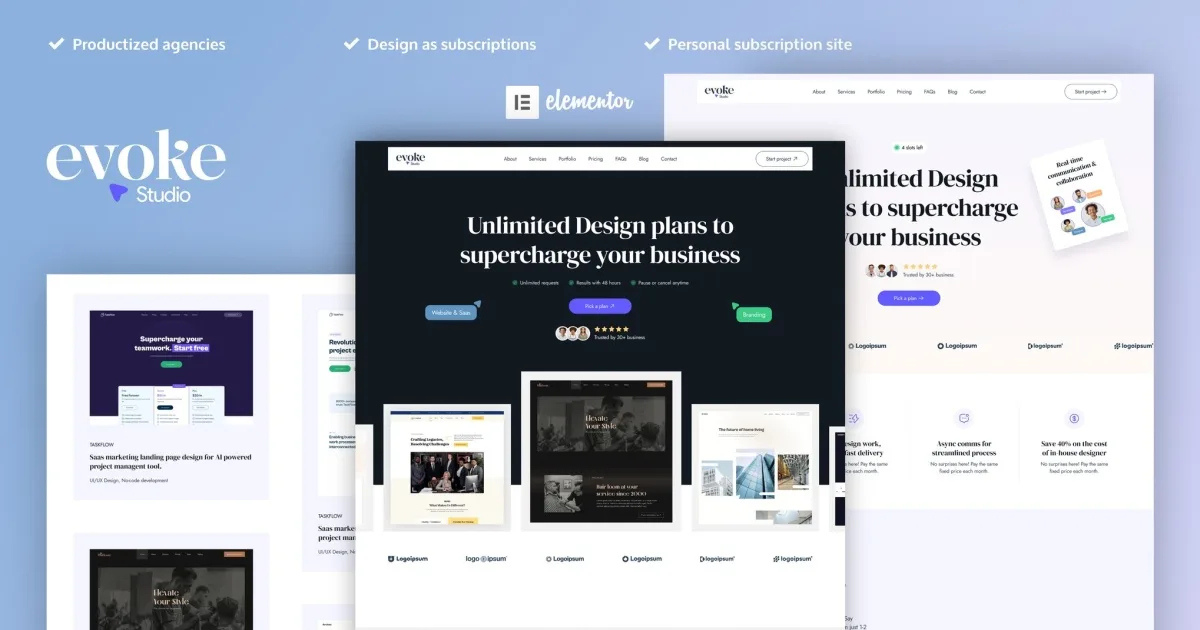
Overview & Details
EvokeStudio is an Elementor Template Kit for digital agencies, creative agencies, digital marketing firms, and web development companies that need a polished site for presenting services and project work. It solves the time-consuming problem of building agency pages, content sections, and reusable site elements from an empty canvas. Instead of designing each layout from scratch, webmasters can import coordinated templates and adjust them visually for a consistent agency website.
With EvokeStudio, users can build agency websites featuring two Home Pages, About, Service, Portfolio, Blog, Blog Post, Pricing, Contact, FAQ, Header, Footer, and 404 templates. Elementor and the Envato Elements plugin are used for installation, while Elementor Pro is required for some templates and features. Day-to-day customization includes changing global fonts and colors, editing individual sections, replacing portfolio content, updating pricing details, and adapting layouts through the drag-and-drop visual builder.
EvokeStudio Key Features
- Drag-and-Drop Editing: Customize layouts visually through Elementor without writing code.
- Global Style Controls: Manage fonts and colors from one central location.
- Individual Element Editing: Fine-tune specific widgets and sections when needed.
- Agency-Focused Layouts: Present creative services, digital marketing work, and web development projects.
- Multiple Home Pages: Choose from two Home Page layouts for different agency presentations.
- Complete Page Collection: Includes About, Service, Portfolio, Blog, Blog Post, Pricing, Contact, FAQ, and 404 templates.
- Header and Footer Templates: Create reusable site-wide navigation and footer areas.
- Theme Compatibility: Works with most Elementor-compatible themes.
- Fast-Loading Structure: Provides layouts designed with loading performance in mind.
Download Latest GPL Version of EvokeStudio Elementor Template Kit
Import and test EvokeStudio in a local XAMPP or LocalWP staging installation before using it on a live client site. Install Elementor and Envato Elements, add Elementor Pro where required, then import Global Kit Styles and the templates individually. Check tablet and mobile breakpoints, header and footer assignments, page settings, navigation, and contact forms. An official license is recommended for live client websites when author support and licensed stock assets are required.
Note: If you find difficulty to free download EvokeStudio, contact us through Telegram or WhatsApp.
Download EvokeStudio – Creative Digital Agency Elementor Pro Template Kit v1.0
This file is available exclusively to active Premium Members. Subscribe to any plan to unlock instant download access: