Apprista – Creative App Landing Elementor Template Kit v1.0
 By Shine GPL Security Team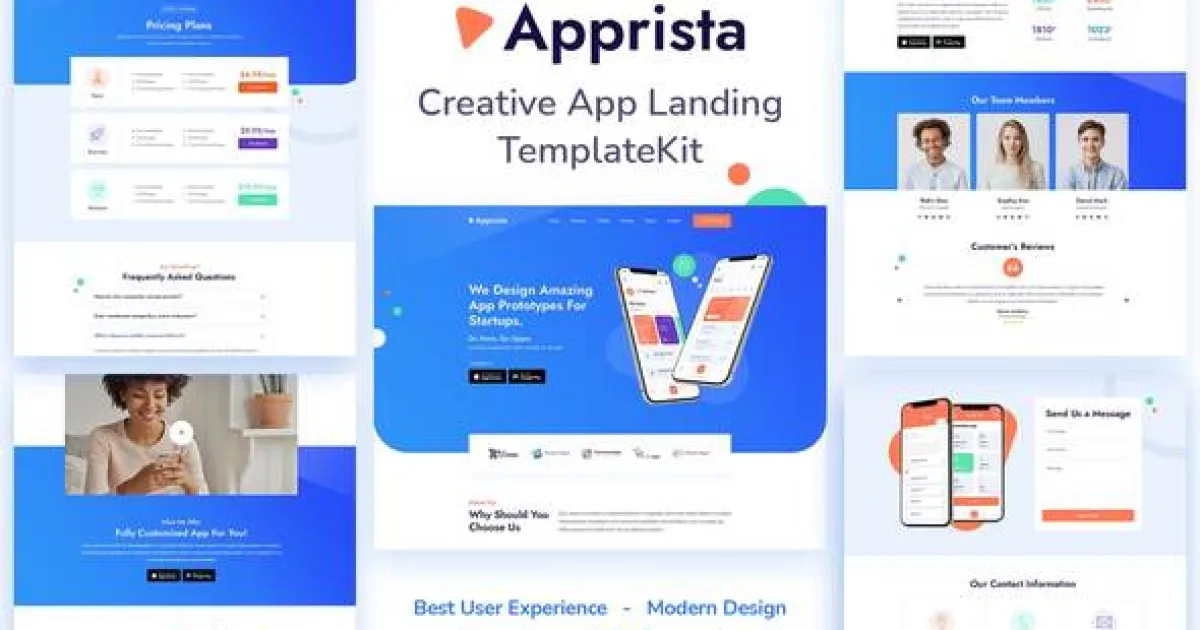
Overview & Details
Apprista is an Elementor Template Kit for app developers, UI/UX designers, and businesses presenting mobile app ideas online. It addresses the need for a clear, focused website that explains app features, pricing, design services, and project details without requiring custom layout work from the ground up. Prebuilt sections help webmasters launch a professional app landing website faster while keeping the structure suitable for customer communication and service inquiries.
With Apprista, users can build Home, About, Features, Pricing, FAQ, and Contact pages for an app design, research, or development business. The kit is designed for Elementor, while no additional form plugin dependency is listed in the source data. Webmasters can edit headings, colors, images, icons, pricing content, frequently asked questions, and contact details directly in Elementor, then assign reusable header and footer layouts as needed.
Apprista Key Features
- App Landing Structure: Organizes app-related business information into focused sections for visitors.
- Home Page Template: Provides a starting layout for presenting the app, services, and primary business message.
- About Page: Helps explain the company, team, or app development background.
- Features Page: Presents application functions and service capabilities in a dedicated layout.
- Pricing Page: Gives businesses a structured area for displaying plans, packages, or service costs.
- FAQ Page: Supports clear answers to common questions from potential customers.
- Contact Page: Offers a dedicated location for contact information and inquiry content.
- Elementor Editing: Allows users to modify text, images, colors, spacing, and page sections through the Elementor interface.
- Typography Setup: Uses Jost and Nunito Google Fonts for the included visual design.
- Icon Support: Includes Font Awesome and Envato Icons for interface and feature presentation.
Download Latest GPL Version of Apprista Elementor Template Kit
Before deploying Apprista for a client, import the templates into a local XAMPP or LocalWP staging site and test each page with Elementor. Check tablet and mobile breakpoints, confirm header and footer assignments, and review contact form behavior after adding your chosen form solution. Verify images and content before moving to production. Purchasing an official license is recommended for live client websites that require author support and licensed stock assets.
Note: If you find difficulty to free download Apprista, contact us through Telegram or WhatsApp.
Download Apprista – Creative App Landing Elementor Template Kit v1.0
This file is available exclusively to active Premium Members. Subscribe to any plan to unlock instant download access: